How to Run Android Applications on Ubuntu | ||||||||||||||||||||||||||||
| Adjust text size: June 25th, 2009, 18:04 GMT| By Marius Nestor | ||||||||||||||||||||||||||||
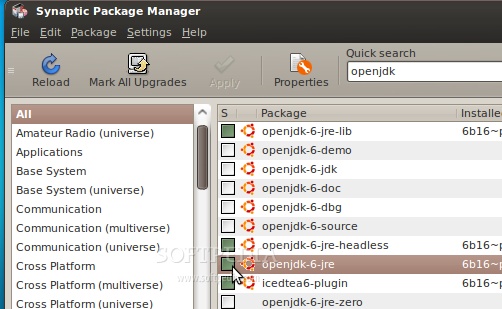
When Google announced and released Android, back in October 2008, everyone knew that it would become the best operating system for mobile devices. Not only is Android open source, but it also comes with a Software Development Kit, which offers the necessary APIs and utilities for developers to easily build powerful applications for Android-powered mobile devices. The following tutorial was created especially for those of you who want to test the Android platform and install various applications, on the popular Ubuntu operating system. OK, so let's get started... shall we? Grab the Android SDK from Softpedia and save the file on your home folder. Editor's note: The tutorial was rewritten for the new Android 2.0 or later, which provides a graphical user interface to setup a virtual device and the SD card. This makes everything a lot easier. No more command-line madness! Step 1 - Installing the requirements Until the download is over, make sure that you have Java installed and the 32-bit libraries (for the x86_64 users ONLY). If you don't have Java (or the 32-bit libraries), go to System -> Administration -> Synaptic Package Manager...
...search for openjdk and double-click on the openjdk-6-jre entry...
...then, search for ia32-libs (ONLY if you are on a x86_64 machine), and double-click on the ia32-libs entry...
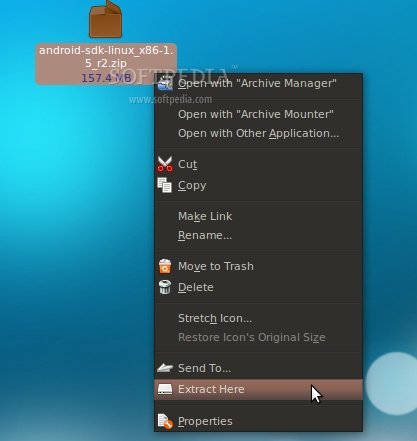
Now, click the 'Apply' button to install the packages. Wait for the packages to be installed and close Synaptic when the process is finished. Step 2 - Android Setup When the Android SDK download is over, right-click on the file and choose the 'Extract Here...' option...
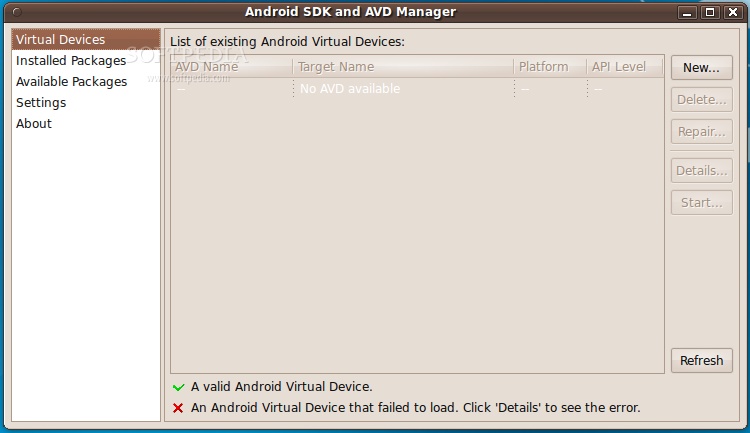
Enter the extracted folder, then enter the tools folder and double click the android file. Click on the "Run" button when you will be asked what you want to do, and the Android SDK and AVD Manager interface will appear...
Go to the "Settings" section and make sure you check the "Force https://..." box. Click the "Save & Apply" button....
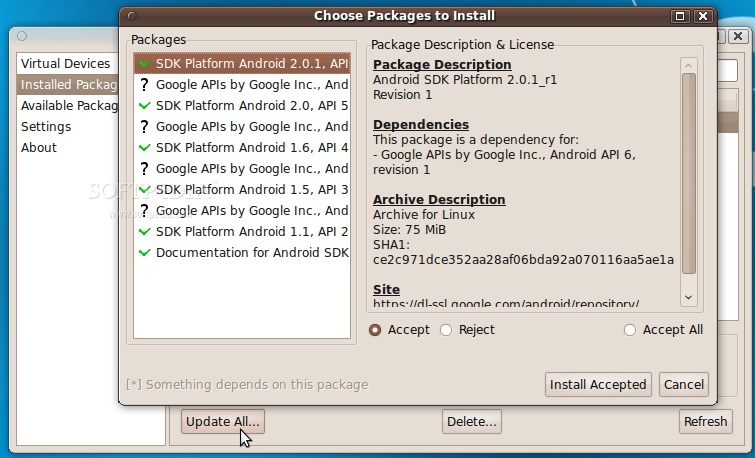
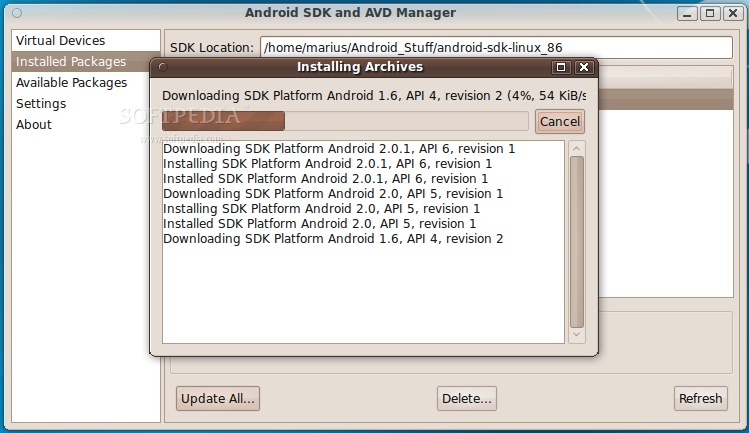
Now go to the 'Installed Packages' section and click the 'Update All' button. A window will appear with all the available updates. Click the 'Install Accepted' button...
...and wait for the packages to be downloaded and installed. It will take a while if you have a slow bandwidth, so go see a movie or something until it finishes...
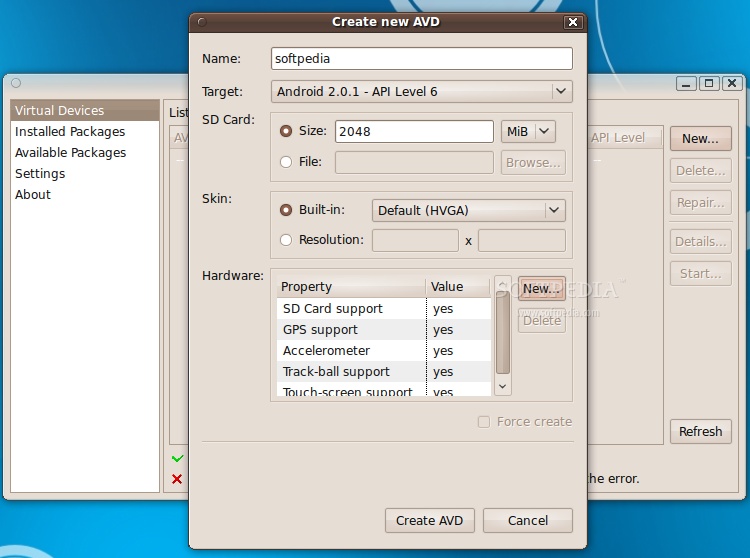
Close the update window when it's done and you will see all the installed SDKs in the 'Installed Packages' section. And now, let's create the virtual device. Go to the 'Virtual Device' section and click the 'New' button. In the new window do the following: - put a name to the device; - select a target (Android system); - put the size for the SD Card; - add the hardware you want have in the emulator. It should look something like this...
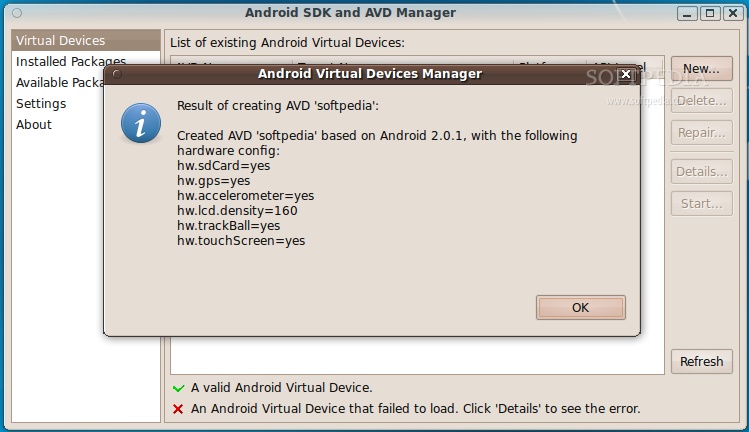
Click the 'Create AVD' button when you're done setting up the virtual device and wait for it to finish. It takes about 1 minute, and you'll be notified by a pop-up...
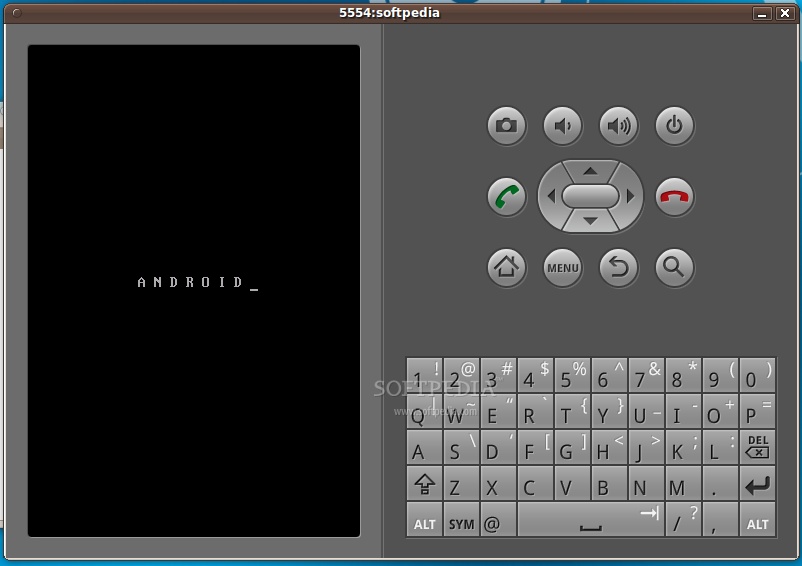
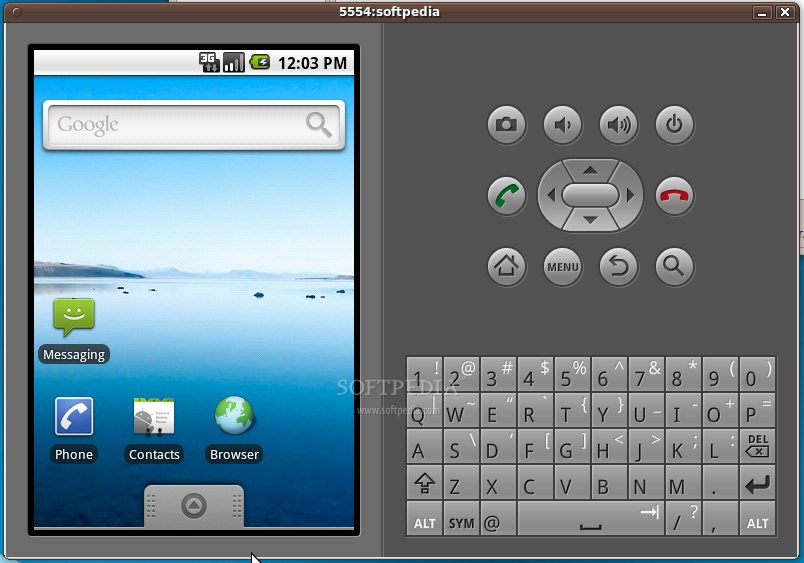
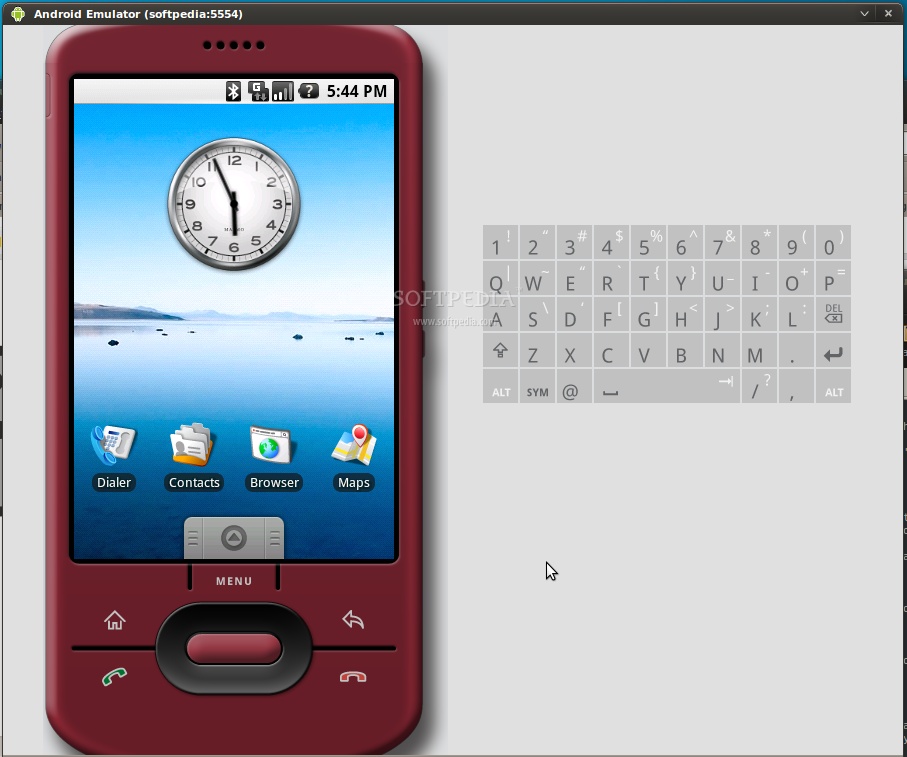
Note: In the above setup, we've created a virtual device for Android 2.0.1 with a 2 GB SD card and the following hardware components: SD Card, GPS, Accelerometer, Track-ball and touch-screen. Now click the 'Start' button, and the 'Launch' button from the next dialog, and the emulator will start...
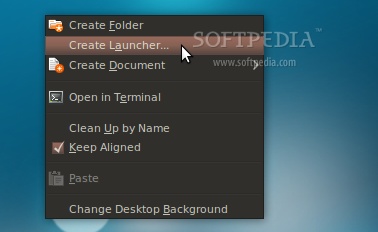
To make things a lot simpler let's create a desktop shortcut, so you won't have to open the terminal every time and type some command, in order to start the Android emulator. Therefore, right-click on your desktop and choose the 'Create Launcher...' option...
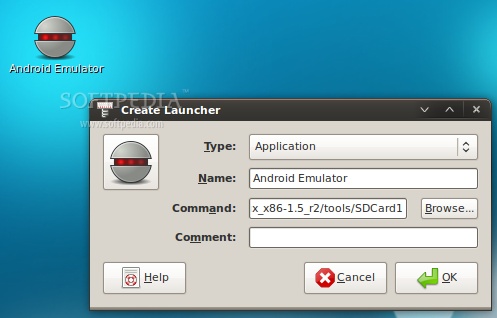
In the Create Launcher window, type 'Android Emulator' (without quotes) in the Name field, and paste the below line in the Command field. Optionally, you can also put a nice icon if you click the icon button on the left... /home/YOURUSERNAME/android-sdk-linux_86/tools/emulator @softpedia
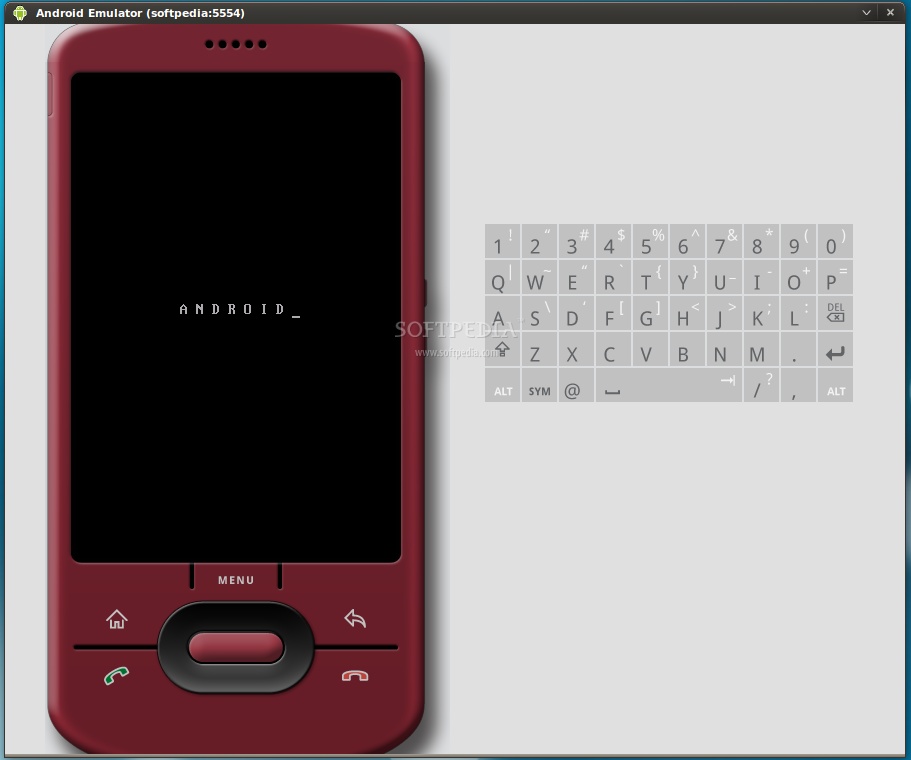
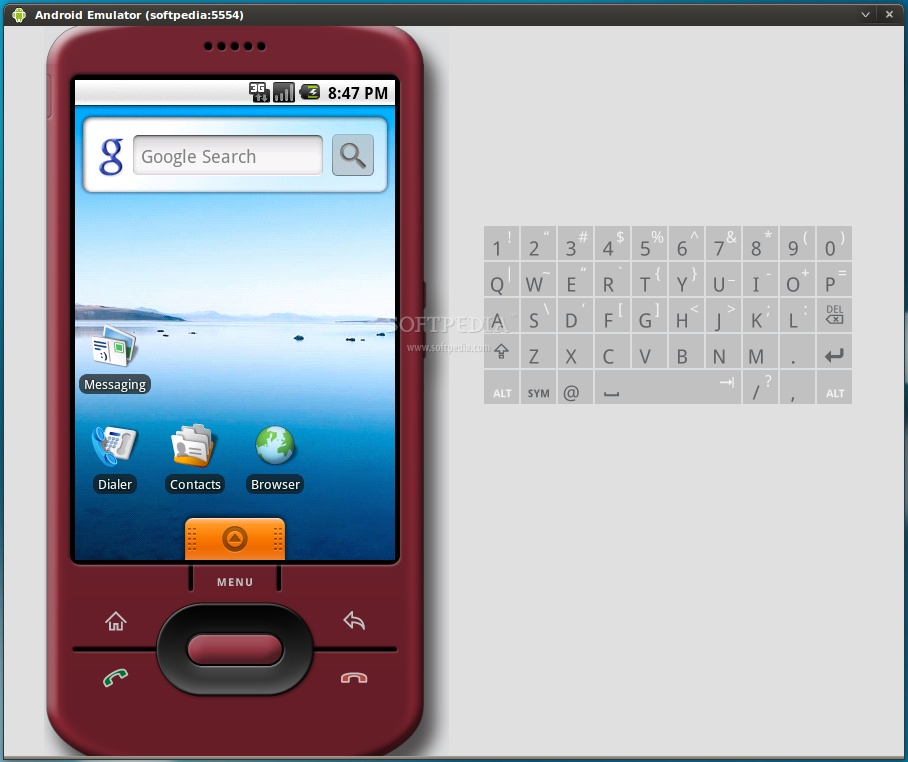
Note: Please replace YOURUSERNAME and the name of the Android Virtual Device (softpedia in our case) with your USERNAME and the name you gave to the virtual device. DO NOT REMOVE the @ sign. Step 3 - Run applications in Android All you have to do now is double-click that desktop shortcut you've just created. The Android emulator will start. Wait for the operating system to load...
When the Android operating system has loaded, you can install and test applications. If you are used with the Android platform, you already know how to do that, but if this is your first time... follow the next instructions.
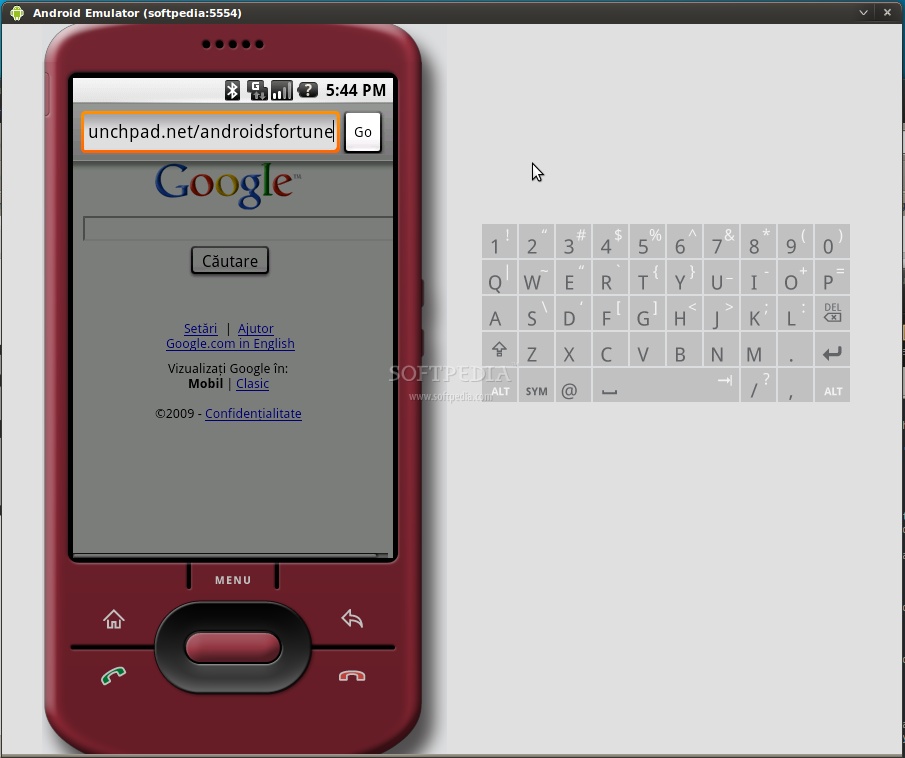
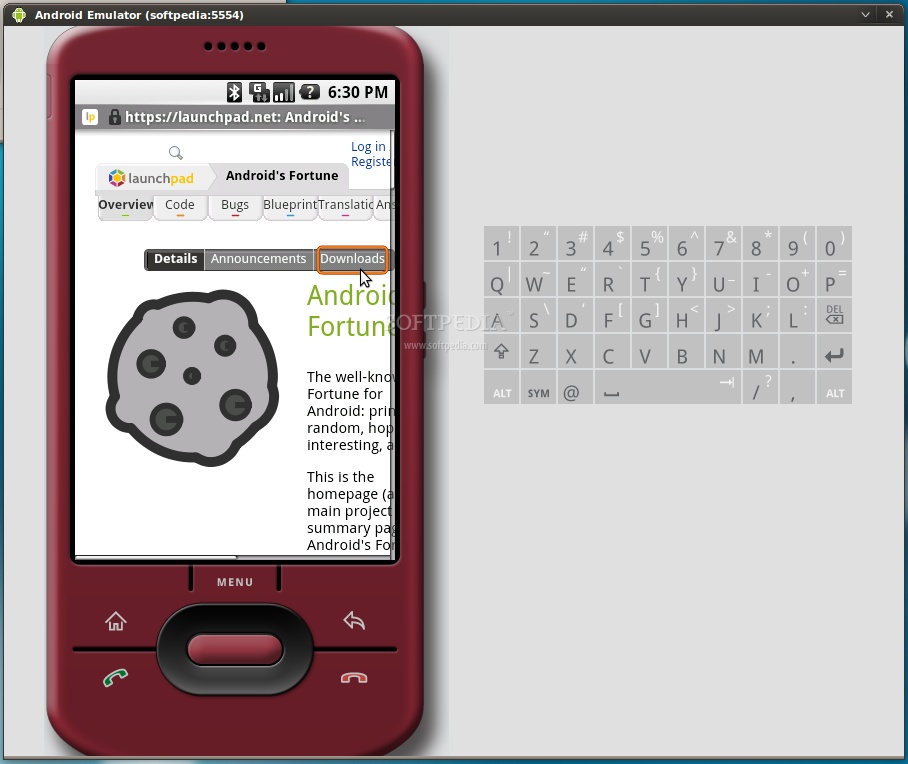
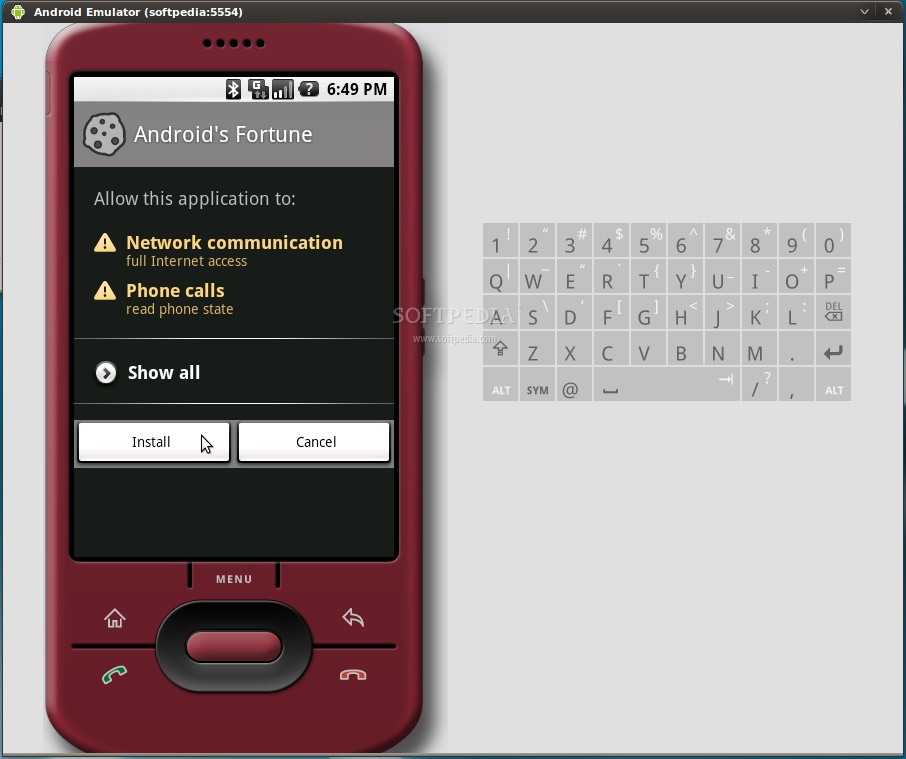
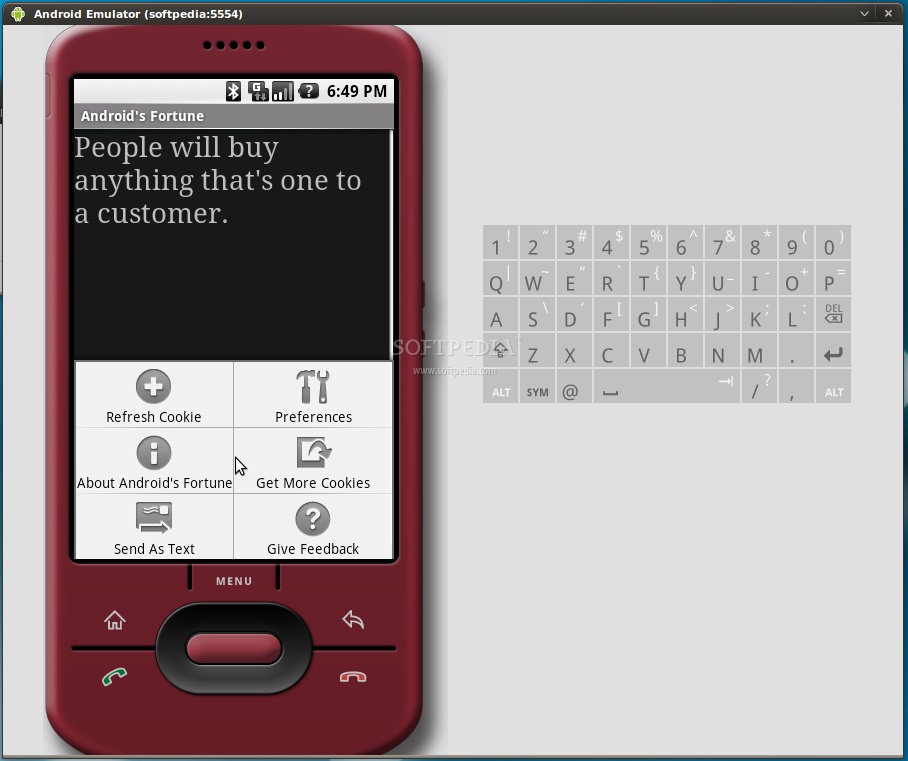
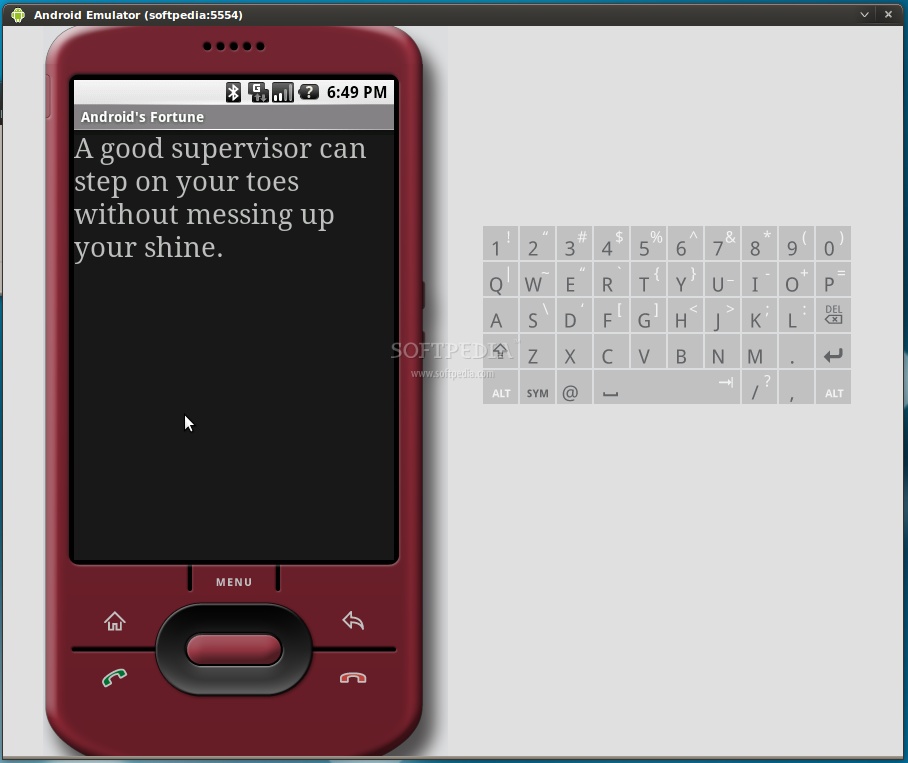
Click the Browser icon, wait for the browser to load and click Menu -> Go to URL. Enter the address from where you can download an Android application with the apk extension. For example, we've easily installed Android's Fortune from Launchpad...
...all you have to do is follow the on-screen instructions! Have fun, and do not hesitate to comment if you want to know more about Android, or if you're stuck somewhere in the tutorial. Follow the editor on Twitter @mariusnestor  Get Softpedia News on your mobile by pointing your browser to m.softpedia.com. Bookmark and enjoy! Get Softpedia News on your mobile by pointing your browser to m.softpedia.com. Bookmark and enjoy!Copyright © 2001-2011 Softpedia. Contact/Tip us at  | ||||||||||||||||||||||||||||
sexta-feira, 14 de janeiro de 2011
How to Run Android Applications on Ubuntu - Softpedia
How to Run Android Applications on Ubuntu - Softpedia: "
"







segunda-feira, 27 de dezembro de 2010
3D dissecado
http://www.gizmodo.com.br/conteudo/giz-explica-como-o-3d-funciona/
Published with Blogger-droid v1.6.5
quinta-feira, 23 de dezembro de 2010
Descoberta mostra que sólitons, além de ondas, são partículas complexas
Descoberta mostra que sólitons, além de ondas, são partículas complexas: "Parece um contra-senso falar em estrutura interna de uma onda. Mas os sólitons - ondas solitárias - não são solitários como se pensava; eles possuem estruturas internas intricadas. As aplicações vão da comunicação aos músculos artificiais."
sexta-feira, 10 de dezembro de 2010
Ensaios de Futurologia.
Os displays de papel em baixa qualidade serão uma realidade nos próximos cinco anos e a China usará como adesivos inteligentes em diversos produtos.
Já os displays de papel de alta qualidade (alta resolução e taxa de atualização) serão amplamente utilizados no setor de decoração a um custo bastante acessível nos próximos dez anos.
Tá registrado.
Já os displays de papel de alta qualidade (alta resolução e taxa de atualização) serão amplamente utilizados no setor de decoração a um custo bastante acessível nos próximos dez anos.
Tá registrado.
Published with Blogger-droid v1.6.5
sexta-feira, 22 de outubro de 2010
No Retreat, No Surrender !!!
Leiam em: http://www.dedalus-atlas.blogspot.com/
O que faz uma pessoa tomar uma atitude dessas ? Posso citar vários motivos, mas não aceito nenhum. Desistir nunca pode ser uma opção. Ontem estava muito triste e sentido, hoje estou tremendamente chateado com este meu amigo. Estas fases as quais estou passando são esperadas quando sofremos tamanha perda.
Valeu Sandro. Valeu nossa discussões que não levavam a nada a não ser satisfazer nossos próprios egos. Valeu pelos papos de cultura inútil, mas que fazíamos rir a beça. Tá bom ... Agora só depois !!!
Abraços !!!
HULK
O que faz uma pessoa tomar uma atitude dessas ? Posso citar vários motivos, mas não aceito nenhum. Desistir nunca pode ser uma opção. Ontem estava muito triste e sentido, hoje estou tremendamente chateado com este meu amigo. Estas fases as quais estou passando são esperadas quando sofremos tamanha perda.
Valeu Sandro. Valeu nossa discussões que não levavam a nada a não ser satisfazer nossos próprios egos. Valeu pelos papos de cultura inútil, mas que fazíamos rir a beça. Tá bom ... Agora só depois !!!
Abraços !!!
HULK
quinta-feira, 21 de outubro de 2010
Remote desktop only on local network
Remote desktop only on local network: "From: http://ubuntuforums.org/showthread.php?t=1143079&page=2
had the same problem with 9.04, no advanced tab, server was not listening to the port (even default one), but I just found out how to set all this.
To use an alternative port:
run gconf-editor from terminal
in the open window go to:
/desktop/gnome/remote_access
Change the alternative_port value (mine was 5900) to the one you want
Select (check) use_alternative_port
And now, run:
/usr/lib/vino/vino-server
(you can make it run at login by addin the previous line in the: System->Preferences->Startup Applications)
Good Luck!
zensys
June 17th, 2009, 03:01 PM
I had the same problem but was able to solve it by unchecking the option 'configure network automatically to accept connections' This option requires the UPnP feature in your router to be enabled.
Surprisingly (I find computers have a strong resemblance to women) now I also have outside connectivity with the automatically accept connections option checked and UPnP disabled.
Hope this helps more than it confuses!"
had the same problem with 9.04, no advanced tab, server was not listening to the port (even default one), but I just found out how to set all this.
To use an alternative port:
run gconf-editor from terminal
in the open window go to:
/desktop/gnome/remote_access
Change the alternative_port value (mine was 5900) to the one you want
Select (check) use_alternative_port
And now, run:
/usr/lib/vino/vino-server
(you can make it run at login by addin the previous line in the: System->Preferences->Startup Applications)
Good Luck!
zensys
June 17th, 2009, 03:01 PM
I had the same problem but was able to solve it by unchecking the option 'configure network automatically to accept connections' This option requires the UPnP feature in your router to be enabled.
Surprisingly (I find computers have a strong resemblance to women) now I also have outside connectivity with the automatically accept connections option checked and UPnP disabled.
Hope this helps more than it confuses!"
segunda-feira, 4 de outubro de 2010
Método de integração
Método de integração: "
If the integrand contains a single factor of one of the forms we can try a trigonometric substitution.
If the integrand contains a piece of the form we use the substitution
This will transform the integrand to a trigonometic function. If the new integrand can't be integrated on sight then the tan-half-angle substitution described below will generally transform it into a more tractable algebraic integrand.
Eg, if the integrand is √(1-x2),
If the integrand is √(1+x)/√(1-x), we can rewrite it as
Then we can make the substitution
When the integrand contains a piece of the form we use the substitution
E.g, if the integrand is (x2+a2)-3/2 then on making this substitution we find
If the integral is
then on making this substitution we find
After integrating by parts, and using trigonometric identities, we've ended up with an expression involving the original integral. In cases like this we must now rearrange the equation so that the original integral is on one side only
As we would expect from the integrand, this is approximately z2/2 for large z.
If the integrand contains a factor of the form we use the substitution
Find
![\begin{matrix} \int_1^z \frac{\sqrt{x^2-1}}{x}dx & = & \int_1^\alpha \frac{\tan \theta }{\sec \theta }\sec \theta \tan \theta \,d\theta & z>1 \\ & = & \int_0^\alpha \tan^2 \theta \, d\theta & \alpha = \sec^{-1} z \\ & = & \left[ \tan \theta -\theta \right]_0^\alpha & \tan \alpha = \sqrt{\sec^2 \alpha -1} \\ & =& \tan \alpha -\alpha & \tan \alpha = \sqrt{z^2-1} \\ & =& \sqrt{z^2-1} - \sec^{-1} z & \\ \end{matrix}](https://lh3.googleusercontent.com/blogger_img_proxy/AEn0k_tpbNcwFB8WA9qly_WuYqmTQ1RagOkBDcGrwsRfzxv7lMHsghKhw3uFG8BSADBdMeArvrWjy8hRtuDraCwsrrrWWAfLmMWlFH4Z59pKWhkx7sd3GIfjKTCix0nCILwWoF_olkCriUOBX7GyUhtv=s0-d)
Find

We can now integrate by parts
![\begin{matrix} \int_1^z \frac{\sqrt{x^2-1}}{x^2}dx & = & -\left[ \tan \theta \cos \theta \right]_0^\alpha + \int_0^\alpha \sec \theta \, d\theta \\ & = & -\sin \alpha +\left[ \ln (\sec \theta + \tan \theta ) \right]_0^\alpha \\ & = & \ln (\sec \alpha + \tan \alpha ) - \sin \alpha \\ & = & \ln (z+ \sqrt{z^2-1} ) - \frac{\sqrt{z^2-1}}{z}\\ \end{matrix}](https://lh3.googleusercontent.com/blogger_img_proxy/AEn0k_s9g-dFCc55LVtb6Aq6I_Uj58Jm2MObBJ62loVnjbI-vpmZab8k5cEYgcPamLGmRc2osyuYQiqPQ23cZy1JXGwTXWGBAM61HhNHU0CvS9gtagSqGZTKeTWrOOEmM38sA_6z14bZwIWa6w1Vjtruag=s0-d)
Navigation: Main Page · Precalculus · Limits · Differentiation · Integration · Parametric and Polar Equations · Sequences and Series · Multivariable Calculus & Differential Equations · Extensions · References
Retrieved from 'http://en.wikibooks.org/wiki/Calculus/Integration_techniques/Trigonometric_Substitution'
Categories: Books to be merged | Calculus (book)
From Wikibooks, the open-content textbooks collection Calculus | Integration techniques
Jump to: navigation, | A Wikibookian suggests that Solving Integrals by Trigonometric substitution be merged into this book or chapter. Discuss whether or not this merger should happen on the discussion page. |
| ← Integration techniques/Partial Fraction Decomposition | Calculus | Integration techniques/Tangent Half Angle → |
| Integration techniques/Trigonometric Substitution |
If the integrand contains a single factor of one of the forms
we can try a trigonometric substitution.
- If the integrand contains
- If the integrand contains
- If the integrand contains
[edit] Sine substitution

If the integrand contains a piece of the form
we use the substitution
This will transform the integrand to a trigonometic function. If the new integrand can't be integrated on sight then the tan-half-angle substitution described below will generally transform it into a more tractable algebraic integrand.
Eg, if the integrand is √(1-x2),

If the integrand is √(1+x)/√(1-x), we can rewrite it as

Then we can make the substitution
![\begin{matrix} \int_0^a \frac{1+x}{\sqrt{1-x^2}} dx & = & \int_0^\alpha \frac{1+\sin \theta}{\cos \theta} \cos \theta \, d\theta & 0 <a < 1 \\ & = & \int_0^\alpha 1+ \sin \theta \, d\theta & \alpha = \sin^{-1} a \\ & = & \alpha + \left[ - \cos \theta \right]_0^\alpha & \\ & = & \alpha + 1 - \cos \alpha & \\ & = & 1+ \sin^{-1} a - \sqrt{1-a^2} & \\ \end{matrix}](https://lh3.googleusercontent.com/blogger_img_proxy/AEn0k_sMYAlbiOUBPWBeHAZGjiG8BND-NyKFiWtjSBWxRRrkxCjsZmJtvkCMJcDybtMrt4qzn-5BdbE0zwtZv8HL4uJ9j3bMst1_OGVOcriorxzruZVsLT7xHt11n2_oQVi5Lak1zAm2AlAN7bj-9B_izQ=s0-d)
[edit] Tangent substitution

When the integrand contains a piece of the form
we use the substitution
E.g, if the integrand is (x2+a2)-3/2 then on making this substitution we find
![\begin{matrix} \int_0^z \left( x^2+a^2 \right)^{-\frac{3}{2}}dx & = & a^{-2} \int_0^\alpha \cos \theta \, d\theta & z>0 \\ & = & a^{-2} \left[ \sin \theta \right]_0^\alpha & \alpha = \tan^{-1} (z/a) \\ & = & a^{-2} \sin \alpha & \\ & = & a^{-2} \frac{z/a}{\sqrt{1+z^2/a^2}} & = \frac{1}{a^2} \frac{z}{\sqrt{a^2+z^2}} \\ \end{matrix}](https://lh3.googleusercontent.com/blogger_img_proxy/AEn0k_sA3zCNbhlJ1xJeDtyxs3yYPt1QKYPquRmW7ScF9YeY9RfCyiOPNJmSQgYy_5tNmT-4zBgjT0VjbbGyQNCVvelSpCFCeywCyjdKc-eO8mEbLzXoo4R_6MTAUnQJXLnM4w5iRUeRcpKkbWF8vdTgIg=s0-d)
If the integral is

then on making this substitution we find
![\begin{matrix} I & = & a^2 \int_0^\alpha \sec^3 \theta \, d\theta & & & \alpha = \tan^{-1} (z/a) \\ & = & a^2 \int_0^\alpha \sec \theta \, d\tan \theta & & & \\ & = & a^2 [ \sec \theta \tan \theta ]_0^\alpha & - & a^2 \int_0^\alpha \sec \theta \tan^2 \theta \, d\theta & \\ & = & a^2 \sec \alpha \tan \alpha & - & a^2 \int_0^\alpha \sec^3 \theta \, d\theta & + a^2 \int_0^\alpha \sec \theta \, d\theta \\ & = & a^2 \sec \alpha \tan \alpha & - & I & + a^2 \int_0^\alpha \sec \theta \, d\theta \\ \end{matrix}](https://lh3.googleusercontent.com/blogger_img_proxy/AEn0k_v7ELE2lxRVrJDI9VaBiRtBijix-0hNYHM_cfbFNZHt1ZL8KFWp_Wo_syuxJ4g972KdOaBa5fO1ILD0AJkJLdjEjfhVeSJvVPkd-cn-Xta_FDaQfrPaccv4ebdxffHuF6IhJfoLD7t6AiCIcbWP1w=s0-d)
After integrating by parts, and using trigonometric identities, we've ended up with an expression involving the original integral. In cases like this we must now rearrange the equation so that the original integral is on one side only
![\begin{matrix} I & = & \frac{1}{2}a^2 \sec \alpha \tan \alpha & + & \frac{1}{2}a^2 \int_0^\alpha \sec \theta \, d\theta \\ & = & \frac{1}{2}a^2 \sec \alpha \tan \alpha & + & \frac{1}{2}a^2 \left[ \ln \left( \sec \theta + \tan \theta \right) \right]_0^\alpha \\ & = & \frac{1}{2}a^2 \sec \alpha \tan \alpha & + & \frac{1}{2}a^2 \ln \left( \sec \alpha + \tan \alpha \right) \\ & = & \frac{1}{2}a^2 \left( \sqrt{1+\frac{z^2}{a^2}} \right) \frac{z}{a} & + & \frac{1}{2}a^2 \ln \left( \sqrt{1+\frac{z^2}{a^2}}+\frac{z}{a} \right) \\ & = & \frac{1}{2}z\sqrt{z^2+a^2} & + & \frac{1}{2}a^2 \ln \left(\frac{z}{a} + \sqrt{1+\frac{z^2}{a^2}} \right) \\ \end{matrix}](https://lh3.googleusercontent.com/blogger_img_proxy/AEn0k_vmRJUKY2KMeUpr5Qooj22FLKwSdh-zvnYHegDs_mtrye7T4QJfOgQVUJFpesvFfqdlprm8lxZQ80LhZKjzSNSRgrOGtLui0xCNHhYx_j7HQD_OZHie2tL605tfPIBrfg6D8WIgrnljNZjjmI7z=s0-d)
As we would expect from the integrand, this is approximately z2/2 for large z.
[edit] Secant substitution

If the integrand contains a factor of the form
we use the substitution
[edit] Example 1
Find
[edit] Example 2
Find
We can now integrate by parts
Navigation: Main Page · Precalculus · Limits · Differentiation · Integration · Parametric and Polar Equations · Sequences and Series · Multivariable Calculus & Differential Equations · Extensions · References
Categories: Books to be merged | Calculus (book)
Assinar:
Postagens (Atom)